

Have you ever been in a situation wherein you needed a file from your other computer at home and you are on the other side of the world? Or ever been in a scenario where you are in dire need to get in touch with people for a business presentation meeting? The TeamViewer remote viewing application has been a key in helping us out on frustrating times like these by providing us access to other computers in our network, over the internet.
Let me provide you a typical scenario:
Ronnie is a computer technician who is the go-to guy among his peers when it comes to major computer problems. Annie is a friend who has just bought a new laptop and now she seems to be having a problem activating the Bluetooth feature on her device as she has installed a new operating system on it. She contacted Ronnie to ask for some assistance but unfortunately Ronnie is out of town, although he expressed that he is very eager to help her. How could he possibly fix Annie's laptop without having to go through the tedious task of enumerating and explaining the steps she needed to undertake in order to troubleshoot the cause of the problem?
TeamViewer connects to any PC or server around the world within a few seconds. You can remote control your partner's PC as if you were sitting right in front of it.
With TeamViewer, Ronnie will be able to access Annie's computer and do the troubleshooting by himself and fix the issue in the fastest manner possible.
You might be thinking: "How about security, we are letting an outsider access our computers remotely?" Well, I would like to assure you this, TeamViewer got it all covered:
Your security and privacy have always been our priority. We understand that when you work on the Internet, you expect secure data channels and privacy protections.
Personally, I have tried this app and all I can say is that it does what it says. All you have to do is install the app on both computers, get a common passcode that will be used by both users to create a private connection and you're good to go!
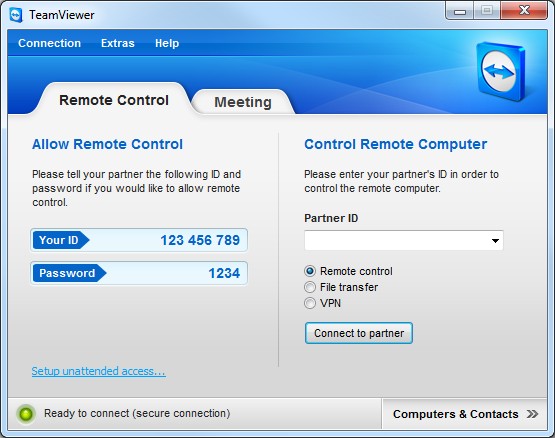
for more info, please follow the link:
TeamViewer - Free Remote Access Solutions
you can download your free version here:
Note: Commercial users are welcome to use the application for trial purposes but TeamViewer is free for all non-commercial users!

No comments:
Post a Comment