Sunday, December 11, 2011

TeamViewer - Remote Access Over the Internet


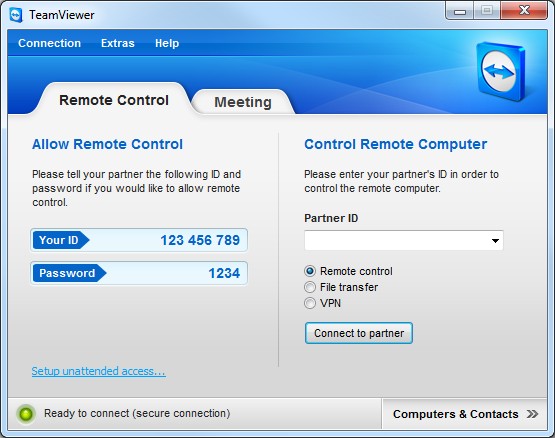
Have you ever been in a situation wherein you needed a file from your other computer at home and you are on the other side of the world? Or ever been in a scenario where you are in dire need to get in touch with people for a business presentation meeting? The TeamViewer remote viewing application has been a key in helping us out on frustrating times like these by providing us access to other computers in our network, over the internet.

Let me provide you a typical scenario:
Ronnie is a computer technician who is the go-to guy among his peers when it comes to major computer problems. Annie is a friend who has just bought a new laptop and now she seems to be having a problem activating the Bluetooth feature on her device as she has installed a new operating system on it. She contacted Ronnie to ask for some assistance but unfortunately Ronnie is out of town, although he expressed that he is very eager to help her. How could he possibly fix Annie's laptop without having to go through the tedious task of enumerating and explaining the steps she needed to undertake in order to troubleshoot the cause of the problem?

This is where TeamViewer comes in.
TeamViewer connects to any PC or server around the world within a few seconds. You can remote control your partner's PC as if you were sitting right in front of it.
With TeamViewer, Ronnie will be able to access Annie's computer and do the troubleshooting by himself and fix the issue in the fastest manner possible.

You might be thinking: "How about security, we are letting an outsider access our computers remotely?" Well, I would like to assure you this, TeamViewer got it all covered:
Your security and privacy have always been our priority. We understand that when you work on the Internet, you expect secure data channels and privacy protections.
Personally, I have tried this app and all I can say is that it does what it says. All you have to do is install the app on both computers, get a common passcode that will be used by both users to create a private connection and you're good to go!


for more info, please follow the link:

TeamViewer - Free Remote Access Solutions

you can download your free version here:


Note: Commercial users are welcome to use the application for trial purposes but TeamViewer is free for all non-commercial users!

The All New Kia Rio

2012 Kia Rio

The all-new Rio has integrated the latest technology with the sporty and dynamic design. It fits for young people who seek for a distinctive and intelligent car with its innovative features, good performance, and eco-friendly engine.


You can have a pleasant drive and enjoy the newest features in the new Rio. Share this awesome news now!

follow the link for more deatils:

A manly scent may be attractive, but the new Kia Rio is what makes you more desirable. Get real, Get Rio! #KIARIOgogetreal

Saturday, December 10, 2011

Apple iPad 3

Hear ye! Hear ye!


A new iPad is rumoured to be in the works and as early as now we are already hearing different speculations on how the next most-desired gadget will vary from the past versions. Apple iPad 2's release was just last 2nd quarter of the year and now iPad 3 is said to be release in the upcoming year. The device is quoted to be powered by Apple's A6 ARM-based processor which is a quad-core. Here is the video of the users' wishlist on how they would want the new iPad to be:


If I were one of those who bought the 2nd retail of this iDevice, I would probably now be drooling on this upcoming release in such a short span of time. I remember a friend who just recently dispatched his iPad just to come up with a budget to purchase an iPad 2. I think it's time to look for a prospective buyer for that, bro! :P

Just a trivia: Did you know that the A6 ARM-based next-generation processor used on Apple devices is actually OEM-manufactured by Samsung? So how about the ongoing legal battles on patents among the two giants, you might ponder? Well, that's how it works in the big game though it's gonna be a win-win situation this time around.

For further reading, please refer to the link below:

Apple iPad 3 - Specs, Release Date Rumor Round-up! Everything We Know So Far! | TechPinas : Philippines' Technology News, Tips and Reviews Blog

credits to: TechPinas.com, TechRadar.com

Musical Computer Keyboard

Hello there!

It's Lunar Eclipse Saturday...and I got another freeware to share:

Accordion
by williamj

Ok, so when was the last time you made music using your computer keyboard? Made music with my computer keyboard?! Sounds nonsensical, right? Well, as you can see, as improbable at it may seem, we can now transform our own computer keyboards from "boring" to "musical". All we need is this cute little program called Accordion and we can bang away on those keyboards to make beautiful music together!


Although the standard MIDI is set default to Accordion, you can actually choose from 107 musical instruments and different sound effects built-in on this application! Well, ain't that a "WOW!"? Amuse your friends and show-off your musical inclinations using this freeware app by williamj. Truly, this marvelous app will never cease to wonder not only the kids but also those who are kids-at-heart.

download it here or follow the link below: 

Tuesday, December 6, 2011

K-9 Web Protection


Hey guys!

Do you have underage internet users at home? Do you ever wonder if they are safe from accessing websites that are not suitable for them? The reality is, we are not always there to guide them at every click. That is why the clever people at Blue Coat Systems decided to create a web-based software, the K9 Web Protection, to help us supervise their activities and monitor their internet usage. 

K-9 Web Protection software gives us the following points that we should consider before choosing a third-party security software that we will use to police our internet:
Over-blocking: Some security solutions might be too restrictive, and block many sites you or your children need or want to see. An overly restrictive solution can be frustrating for you and your family if you have to unblock sites on a regular basis.
Under-blocking: On the other hand, if your security software does not have sophisticated Web filtering capabilities, it may not block enough inappropriate or dangerous content. As a result, your children may wander into (or intentionally find) the sites you don’t want them to see.
The following are the features of K-9:

Content Categories

You can easily block entire categories of content by choosing from any of K9’s 69 categories, including:
  • Personal pages and blogs
  • Content servers
  • Suspicious
  • Extreme
  • Non-viewable
  • Web applications
  • Placeholders
Safe Search

Safe Search is supported by many leading search engines as a way to block search results for offensive topics. For example, Safe Search might not show any results in a search for adult photos. K9 Web Protection also enables you to force users to use Safe Search with the following search engines: Google, A9, AltaVista, Microsoft Live, Yahoo, Ask and Orange.co.uk.

Personal Firewalls and Internet Security Products

K9 Web Protection is compatible with the following third-party personal firewall and Internet security products:
  • Personal firewalls: Comodo
  • Anti-virus products: Avast, Avira
  • Internet security suites: McAfee, F-Secure, Norton/Symantec, Computer Associates and Check Point ZoneAlarm
NightGuard

In addition to enabling you to allow or block Web access during certain times of the day, K9 Web Protection offers NightGuard — a convenient way to block all Web access during certain times of the day or night. For example, using NightGuard, with a few clicks you can disable all Web access between 10 p.m. and 7 a.m. every day.


Logging Features

You can also keep track of K9’s activity with convenient, detailed logs that enable you to:
  • Organize logs by time of day, secure Web sites blocked and unsafe search blocks
  • Remove old log entries
  • Store logs on the computer in a format that is readable only by K9 Web Protection
I have been using this software for 2 years already and all I can say is that it lives up to expectations. This software will definitely provide you the peace of mind you have been looking for. Oh, and one more great thing about this software...it's FREE!

Now, does it get any better than that?

click on the link to go to the download page:

Sunday, December 4, 2011

f.lux - Better Lighting for Your Computer

Another feature freeware for today is f.lux, the ever-reliable midget software designed to make your computer screens look good. Ahm, but please don't take that literally though, as what I meant is that this app will make your screens good to look at. 


The developers of this freeware asks us:
Do you ever notice how people texting at night have that eerie blue glow?
or wake up ready to write down the next great idea, and get blinded by your computer screen?
During the day, computer screens look good—they're designed to look like the sun. But, at 9PM, 10PM, or 3AM, you probably shouldn't be looking at the sun!
f.lux fixes this: it makes the color of your computer's display adapt to the time of day, warm at night and like sunlight during the day.
Well, isn't that a "bright" idea? A program that automatically adjusts our computer screen's brightness in accordance to the time of the day? The last thing we need as we enjoy surfing the internet or tinkering on our blogs is to have our eyesight deteriorating due to prolonged exposure to the bright luminescence of our computer monitors!

Ok, so how does this software works?

The developers answered this simply:
Tell f.lux what kind of lighting you have, and where you live. Then forget about it, as f.lux will do the rest, automatically.


So take their word for that (I did!), and save yourself some eyesight! :P

click on the link to download the set-up rar file:

>>f.lux<<

Motorola Droid Razr

Reblogging a post by one of my hero bloggers, Mark Milan Macanas of TechPinas:

Motorola Droid Razr Price, In the Flesh Photos, Packaging Shot - Out Now via WidgetCity! | TechPinas : Philippines' Technology News, Tips and Reviews Blog


Tintii - Selective Decolorization

Alright, we're up again for another cool freeware offering! Now I give you this pocket-sized wonder app designed to make your HD pictures more exciting.

Tintii takes full color photos and pops the objects of interest, maintaining their vibrant tones while draining the rest of the image to black and white.

In other terms we call this process, selective decolorization. Do you ever wonder how graphic artists do this on photos?


If you notice, the color "red" seems to be floating amidst the hues of black and grey. What happened to the other colors, you may ask? They become decolorized! This is the effect of color saturation as a result of adjustments done by the software on the image. The unique ability of Tintii is to automatically detect the major colors in a photo, rather than restricting you to a rigid set of colors or requiring you to make manual selections. This makes adjustments quick, easy, and more precise than other means.

Here are other samples:


If you are a Photoshop enthusiast, you will be amazed by the ease of applying such effects on your photos,  it's so easy you might blurt out: "watta piece o' cake!"

So let's cut the chit-chat and try this now on our Facebook photo albums. :P

here's the download link:

>>Tintii<<

Symbianize 505: Of BSODs and Clams


The following scribbling is all about immersiondepth's virtual reality journey onto the realm of Symbianize, the new-tech-age community of the country's finest in the field of modern technology...


image credit: litemint of Symbianize


Symbianize 505: Of BSODs and Clams

It was one lazy sunny October afternoon, I was very much preoccupied browsing through a Google search page in my isolated cubicle at home. Desperately looking for a way to fix my virus-laden personal computer's latest issue, I chanced upon a page where a fellow seemingly have a similar dilemma as mine. Wasting no time, I parsed through the page and verified that indeed we share this common problem: "Intermittent Blue Screen of Death (BSOD) Due to IRQL is Less or Not Equal." You see, I was still a newbie in troubleshooting computer issues back then, though that doesn't mean I am entirely new on computers. I have been using computers for the longest time on work-related functions but every time our units bog down, we just dial this 3-digit number and then the IT personnel will come to fix them right away. I never thought that having no technical background on basic troubleshooting will eventually take a toll on me as I now face problems on my very own PC. Well, thanks to Mr. Google. He is, as always, my go-to guy on times like this.  Going back to that Google search having to do with BSOD, clicking on the link led me to this curious website with light blue and sea green backdrop and an emblem of a capital "S" circumvented with 3 stars and a sun. SYMBIANIZE, The Exclusive Pinoy Chat, Mobile & PC Community. "Oh," I said, "cool, a forum site?" Though I am not new to forums either (as I am a member of 4 different local forums using the same handle!) but never did I know that there is a tech forum such as this exists. So this is the so-called Symbianize, I suddenly realized. I'm certain to have heard of the term from my techie friends at work, but I have no inkling it was a website or an online community on the internet. It was a household name at the workplace though I never bothered to ask what it is about. I thought it was just another one of those computer jargon of which I have no technical capability to understand.

So I was up about and eager to explore the Symbianize website hoping to get the resolution for my PC's problem when it seemed that I was stuck at the Welcome page after clicking on the link. Do I still need to sign-up and register to completely view the contents? "Ahm, ok." I began to have some minor hesitations as I know how gruelling it can be to sign-up on forum sites and besides, I was quite in a hurry that time as I was worrying the BSOD will occur any minute. Finally overcoming the reluctance, I promptly registered (used the usual handle I use), patiently read the site’s Dos and Don’ts, went to my email inbox and verified the registration. Accomplishing all that in a flash, I got redirected to a forum thread under PC Applications where there is an ongoing discussion on different types of BSOD errors. Wading through the comments, I found out that this is what I was looking for, Bluescreenview. A tiny program designed to identify the type of stop error occurring on a computer and also assist in determining the applications that are associated with the crash. After thanking the threadstarter and other members who participated on the thread discussion, I went ahead to test the app on my ailing PC. And there it was, it worked like a charm. Like a hound, it immediately pointed to my HP Office Suite (the driver for my now-defunct printer) as the culprit. On the other hand, like a good hunter, I immediately shifted to Safe Mode, killed the process running in the background, and finally uninstalling the perpetrator, banishing it forever from my computer. After days and months of observation and monitoring, the dreaded Blue Screen of Death became a mere ghost of the past. It never haunted me again. My PC was cured and I was happy as a clam. I felt proud because I did it on my own. I did not dial any 3-digit number nor did I call a friend, but instead, I accomplished it with my own initiative with the help of Symbianize on the side.

Well, again thanks to the Google search engine that I came to discover Symbianize. It was a turning point experience for me as I got overwhelmed with that single interaction. Since then, I try to visit Symbianize as often as I can. From twice a week, to every other day, until it became a daily routine. I am always logged in come day or night. I just can't get enough because there is so much to learn, to know, and to find out. Symbianize is like an uncharted body of water wherein I am a captain of a vessel, determined to explore and unravel the depths of its mysteries. I became an active member (and became lesser on my other affiliations, “Dear immersiondepth, we missed you on Facebook…”). I began to get fond of the site, testing the waters on all four corners and found them all equally entertaining and appealing. From the User's Feedback, to the Media Zone and way down to Gags and Jokes section, there was never a dull moment for me when I am at Symbianize. I also witnessed how the site evolved and developed in a span of one year tuning in. Some site features were removed such as the Thanks system while some features were added such as the revival of the ShoutBox.  As I become a lurker, a contributor, an observer and a friend, Symbianize was my hangout.

I am perpetually mesmerized by the individualities of fellow members, the steadfastness of the site moderators (and the beautiful knowledge they impart), the diligence of leveled masters and legends, and the persistent determination of the newcomers to belong and fit in. Maybe, this is why Symbianize is still going stronger after all these years. I think it is not because of what the site is offering to us, all the freebies and stuffs. It is not because of the number of posts we make to level-up or the number of reputations that we incur as we persevere. Most definitely not because of that übercool Symbianize banner bearing the "S" with the 3 stars and a sun, bestowing the all-Filipino pride representation. I believe it is simply because Symbianize is a thriving community of the Philippine's best and brightest in the field of modern technology, unafraid of attaining unlikely goals, partake on resplendent ideas and co-exist harmoniously in this make-believe world of endless marvel and wonder.

Happy Anniversary to Symbianize! It's 5 and counting! More power!

immersiondepth (bona fide member circa 2010)

posted on inidgeyou.tumblr.com as an official entry to Symbianize Essay Writing Contest

Yanko Design - Form Beyond Function

I am always fascinated with the breakthrough of new designs in technology that is shaping today's aesthetic aspect of the modern age. This is the primary reason why I stumbled upon this awesome website dedicated in promoting innovative designs on modern technology, ranging from petty iPhone cellphone cases to kitchen cutlery to heavy machinery that will surely catch you in awe.


Founded in 2002 by Japanese Takashi Yamada, Yanko Design is:
...a web magazine dedicated to introducing the best modern international design, covering from industrial design, concepts, technology, interior design, architecture, exhibition and fashion. It’s about the cutting edge and the classic, the new and the rediscovered. It’s all about the best.

Yanko Design is on the list of Technorati.com’s top 100 most read blogs on the internet, currently ranked at 94 (out of 75,000,000+ blogs).


From the site's by-line: "Form Beyond Function", it is clearly emphasized that Yanko Design is all about putting functionality above anything else on their feature designs. Kudos to YD team for this awesome website where technology and beauty is integrated to bring us modern-industrial-eye-candy! 


Saturday, December 3, 2011

Coolest Gadgets - Reporting on the Latest Cool Gadgets

As one of the top 30 blogsites currently in the so-called blogosphere, Coolest Gadgets is a web page on technology's latest and coolest. Started in 2005, the site has been rated in 2010 as one of the top sites with monthly revenue generation of at least $30K. The site is based in the UK but has a phenomenal audience and set of writers all over the world.

Honda's Micro Commuter Concept Car

From the site owner's words:
We started coolest gadgets for numerous reasons. The most important being we love gadgets and the Net so it just seemed natural to combine the two with this site. We can now also buy gadgets and use this site to justify our spending to partners and the tax man.
As a budding enthusiast of tech blogs, I am going to try my best to emulate and follow the footsteps that this blog has trodden.

Coolest Gadgets, you are truly worthy to be our inspiration!

follow the link to visit the blog:
Coolest Gadgets - Reporting on the Latest Cool Gadgets


giveawayoftheday

Hey peeps!

Another blogging weekend for me! I am really having a hard time catching up with my articles due to my current work schedule. I hope that someday i'll be a prolific writer-slash-blogger and be able update this page more often...

Ok so, uhm, have you heard about this site: www.giveawayoftheday.com?

To start with, I want to tell you that this is one of the technology websites that I visit the most (next to Symbianize!). If you are a fan of freebie licensed software and games, then this site is for you.

We grabbed this from the site's About page:
Every day we offer for FREE licensed software you’d have to buy otherwise! Our Giveaway of the day serves its visitors for more than 4 years and over those years we’ve built a huge fan base that returns to our website over and over again. Many attempts to make a quick buck and copycat us failed so we are the one and the only such service available online. It takes time and effort to build a solid reputation and we put forth both to reach nowadays popularity of our website.
Every day we are proud to present hot software titles and best software authors from all over the world.

I have been a fan of this site for 3 years straight already and as far as my downloads from their offers are concerned, I can say that I am extremely satisfied with their giveaways.

Everyday they offer different apps and games and these offers are good for 24 hours only. Meaning to say, after the 24 hours span from the initial offering, the offers will expire and be replaced by another giveaway. So you got to be always on alert of their announcements because you might miss something that is not-worth-to-be-missed!

So what is the catch, you might ask?

The software and games that they are giving away daily are licensed products offered by software developers for the sake of promoting the said product and for the advertisement of their other product lines as well. They see this as a win-win approach for both developers and consumers as this will provide an avenue for both to meet and exchange thoughts on how to improve the applications without the consumer having to buy it first to try it out.
According the the site's terms and conditions: 
Please note that the software you download and install during the Giveaway period comes with the following important limitations:
1) No free technical support;
2) No free upgrades to future versions;
3) Strictly personal usage.
So there you go, I recommend you try out this cool website and get yourself some free licensed software and games! Just click the ticker below...

and you can just thank me later...:P


Giveaway of the Day

Sunday, November 27, 2011

MP3Gain - The Volume Normalizer

Hey all!

I am now going to share to you this amazing app called MP3Gain. If you are a music lover, you may be quite familiar with the term normalized volume of MP3 songs. Have you ever experienced frequently reaching for your volume knob everytime your music player changes songs because some songs are louder/softer than others? If you have, then we're on the same path! I have then since tried to scourge the internet for a solution to this dilemma and finally got my answer from this incredible freeware app, the MP3Gain.


As per the app site:
  • MP3Gain does not just do peak normalization, as many normalizers do. Instead, it does some statistical analysis to determine how loud the file actually sounds to the human ear.
Basically, the job of this program is to set a peak volume threshold (with the default at 89.0 dB) for all your MP3 files so as to normalize the volume of the songs on your playlist.

The user interface has two simple buttons that will be used to perform the task in a 1-2 punch fashion:
  1. Track Analysis - by clicking on this button, you will see the difference in volume among the target MP3 files. You will be notified which are in need of adjustments and which are already within the set volume threshold.
  2. Track Gain - click on this begin normalizing the volumes to the set target normal volume. Progress bar at the bottom part will alert you when the app is done processing the files.

Now with this nifty compact application, gone are the days of constantly reaching for the knob just to adjust the volume everytime the playlist shifts. Just set your music player on play, and forget!

Here's the download link:

>>MP3Gain<<

Saturday, November 26, 2011

Why Blog?

Blogging has been around since the early 90's and from that fact, we can say that blogging is an enduring component of the Internet that only a few handfuls have taken advantage of. Many have tried to figure it out but as the old adage goes, only few were chosen to succeed. Blogging can be used in many ways, may it be as a marketing tool or just an avenue for exhausting even the pettiest of our thoughts. A blog can be your online diary or a partner in your lucrative business.

So why blog? 

image credit: bigpicturescrapbooking.typepad.com

We blog because we want others to read, know and make out what's on our minds...I suggest you try it now. :]

Welcome to MyDigiSara - Tech Blogging at it's Finest!

After a long hesitation, I have finally decided to create my very own blogsite (yey!). Good thing I already have a Google account in place and everything went on smoothly (in contrary as to what I was expecting it would be).

So what can we expect from this page?

I will be updating this page from time to time and will be sharing some of my thoughts on current events, the latest technologies and well...life in general. This page will be the avenue for the Bre's Files...which consist mostly of invaluable insights from both a personal standpoint and from the bird's eye view of My Digital Saranggola.

This is the new chapter, baby! So let the blogging begin...

image credit: bloghackz.com